 MoreFrame
Guide · AI
Let any AI edit over MCP
Connect Claude or any MCP agent and let it edit with the same tools you use.
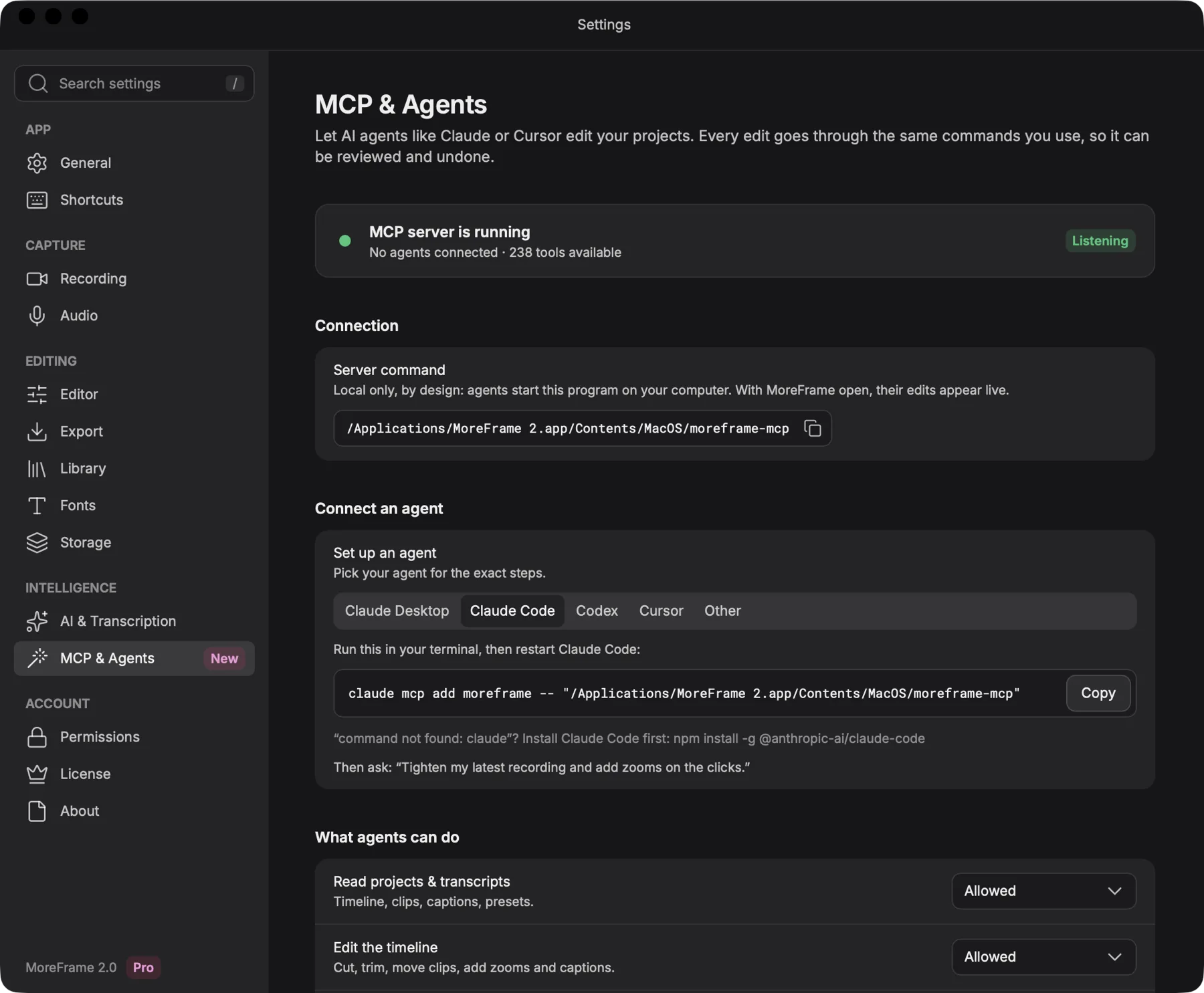
MoreFrame has an MCP server with 238 tools, the same ones behind every button in the app. Any AI agent that speaks MCP can read your project, see rendered frames, edit, add graphics and sound, and export. Its edits appear live in the open editor and undo like any other edit.
Connect an agent
- Open Settings › MCP & Agents. The status at the top shows MCP server is running and how many tools are available.
- Under Connect an agent, pick yours: Claude Desktop, Claude Code, Codex, Cursor or Other.
- Copy the command or config shown there and add it to your agent. Settings shows the exact path for your computer.
- Restart the agent, then ask it for an edit.
For example, with Claude Code the command looks like this (copy yours from Settings, as the path can differ):
claude mcp add moreframe -- "/Applications/MoreFrame.app/Contents/MacOS/moreframe-mcp"Two ways to connect
| Way | For | How |
|---|---|---|
| stdio | Agent apps on your computer: Claude Desktop, Claude Code, Codex, Cursor | The agent starts moreframe-mcp itself. Nothing listens on the network. |
| Local HTTP | Agents running elsewhere on the same computer | http://127.0.0.1:7811/mcp with the token shown in Settings. Only this computer can reach it. |
Prompts to try
Copy one into your agent. Each works on your open project.
Tighten my latest recording: remove dead air and filler words, then add zooms on the clicks.
Make a 30-second MoreFrame ad from my latest recording, with music, sound effects and captions.
Add word-by-word captions in the Karaoke style and keep them clear of my face.
Make a 9:16 version for Reels and check that no text goes outside the safe area.
Use my MoreFrame brand kit and add an end card with a download button.
Find the moment I open Settings and add a callout that points to it.
Add background music that ducks under my voice, then check the loudness.
Put the MoreFrame mascot in the corner and make it talk over my voiceover.
Study this reference video and rebuild its pacing with my recording.
Show me a frame every five seconds, then fix anything that looks off before you export 16:9 and 9:16 at 1080p.
What agents can do
- Read and see: the project, timeline and transcript, rendered frames and short previews, and a search across your footage for what's said and shown.
- Edit: cut, trim, move and speed clips; add zooms, captions, transitions and effects; clean up silences, fillers and retakes.
- Create: use the 500+ motion graphics, your brand kit, templates, storyboards and animated characters.
- Sound: add music and sound effects, generate voice, music and effects with your keys, and measure loudness.
- Record and export: record a window or a website by steps, edit screenshots, and export every format your plan includes.
You stay in control
- The server is off by default and only runs on your computer.
- Under What agents can do, choose what each kind of action is allowed to do, such as reading projects or editing the timeline.
- Recording by an agent is always visible and can be stopped at any time.
- Every agent action is listed in Settings, and every edit can be undone.
- Your keys stay in your computer's keychain. No tool ever returns a key to an agent.
If something's not working
- The agent can't see MoreFrame: check that Settings shows the server running, then restart the agent so it loads the new config.
- “command not found: claude”: install Claude Code first, then run the command again.
- Edits are refused: allow that kind of action under What agents can do.
- Export is refused: 1440p, 4K, WebP, SVG and Lottie need Pro, the same as in the app.