 MoreFrame
Guide · Motion graphics
Make a Rive character that works
The rules a .riv file must follow so poses, the mouth and export all work.
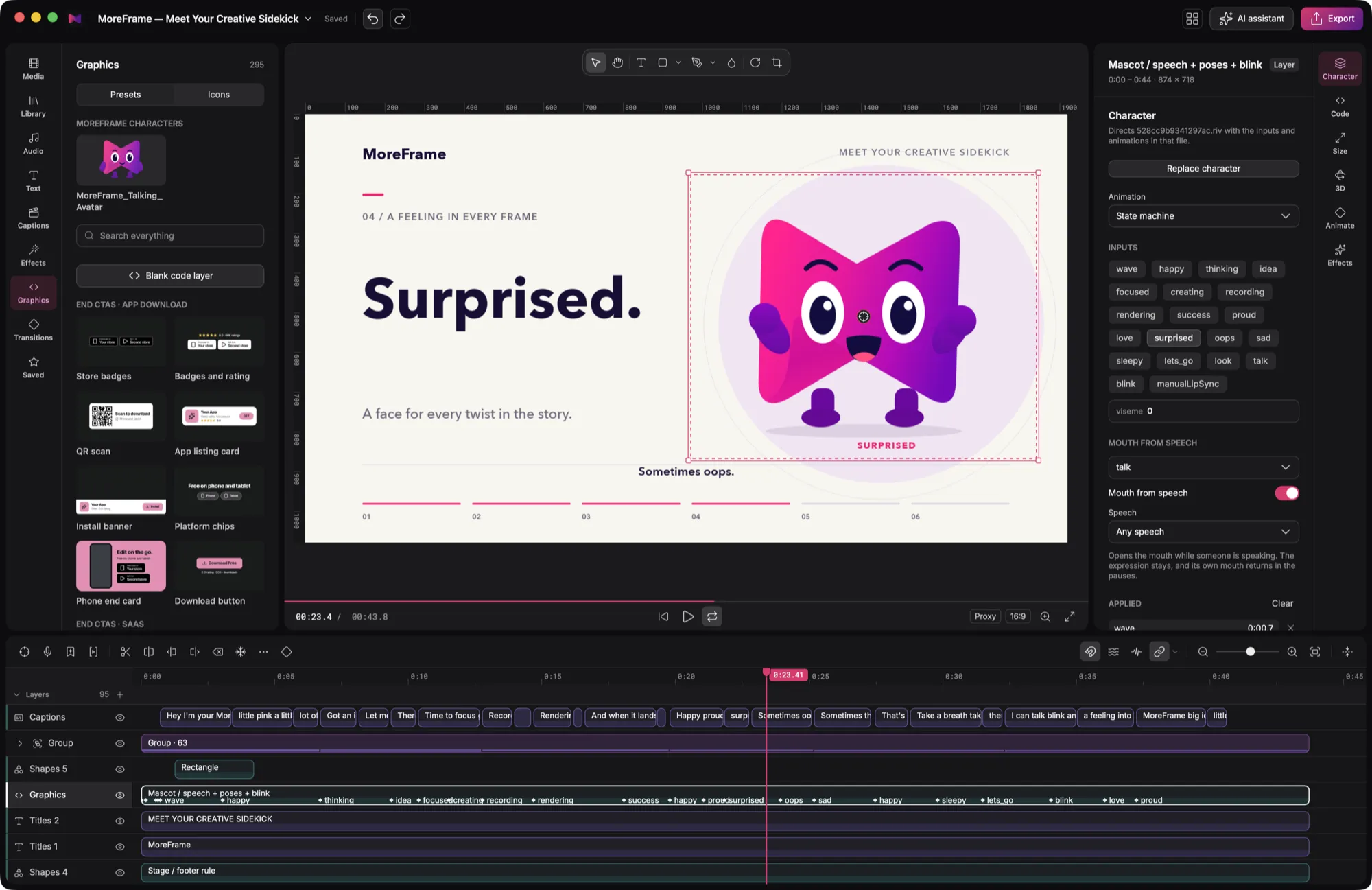
MoreFrame plays your Rive file and sets its controls over time. It doesn't add movement of its own, so anything you want to direct has to be a control in the file. A file built any other way may import, but poses won't switch, the mouth won't move, or export will refuse it.
talk bool for the mouth, one bool per pose, and every image and font embedded in the file.talk mouth that follows the voiceover.Build the character
- One artboard. Leave its background empty so the character sits over your video, and keep it tight around the character: MoreFrame fits the whole artboard into the layer.
- One state machine. MoreFrame plays the first one on the artboard. An animation can play on its own, but then there's nothing to direct.
- An idle loop. The character holds still when nothing is playing, so give it an idle animation that loops if it should look alive.
Add the controls
Each control appears in the inspector's Character tab under the name you give it, so use names people understand.
| Use | Type | Example | How it behaves |
|---|---|---|---|
| Pose or expression | Bool | happy, thinking |
Stays on until turned off. One shows at a time. |
| One-off gesture | Trigger | wave |
Plays once at the moment you mark. |
| Amount or choice | Number | gazeX, emotionIndex |
Stays at its value until changed. |
| Mouth | Bool (or a number) | talk, visemeIndex |
Follows the voice. See below. |
State machine inputs are the safest choice. If you use a view model (data binding):
- Only the file's first view model is used, with its default instance.
- Numbers and bools are listed. Trigger properties only play when an AI agent names them, so use a state machine trigger for gestures.
- Text, colour, image and list properties can't be driven.
Controls inside a nested artboard aren't listed. Bring them up to the main artboard's state machine or view model.
Make the mouth work
Mouth from speech opens and closes the mouth following how loud the voice is. It doesn't know which sounds are being said.
- Best: a
talkbool. On means mouth open; off brings back the expression's own mouth. Build it as a layer over your poses, so the character can smile, talk, and still be smiling in the pauses. MoreFrame picks a control automatically if its name containstalk,speakormouth. - Also works: a number. A name containing
visememoves through mouth shapes while speaking and goes to 0 in the pauses. Any other mouth number, such asmouthOpen, goes to 1 while speaking and 0 in the pauses. So make 0 the closed mouth.
Avoid a mouth baked into each pose (it can't close in the pauses) and a mouth that needs another control turned on first (MoreFrame only sets the one control).
Export it right
- Embed everything. Images and fonts must be inside the
.riv. Files kept beside it, or hosted online, aren't loaded. - Use a current Rive export. Very old formats are refused with a message asking you to export again. MoreFrame plays files with Rive runtime 2.49, so a brand-new editor feature may not play yet.
- Keep it under 128 MB if it's going into a brand kit.
What won't work
- Clicks and hovers: a video has no pointer, so listeners never fire.
- Your own code: anything that needs a website to call into the file won't run.
- Controls that do nothing: an unconnected control shows in the panel and has no effect, so test each one.
Check it before you share it
Import the file into a project, select the character and open its Character tab.
- The character shows, with no missing images or wrong fonts.
- The panel lists your controls. “This file has no switches” means MoreFrame found none.
- Each pose changes the character, and the next pose replaces it cleanly.
- Each trigger plays at the moment you marked.
- With a voice clip overlapping the character, Mouth from speech turns on and the mouth closes in the pauses.
- Dragging the playhead backwards shows the same frame as before.
- It looks right on both a 9:16 and a 16:9 canvas.
- An exported video matches the preview.
rive_inspect on the file. It lists every artboard, animation and control MoreFrame can read.Rights
A file you bring keeps its own licence, so make sure you're allowed to use the character and everything in it.